Spheres
We segment a sphere into very coarse voxel meshes. The Python code used to generate the voxelations and figures is included below.
Segmentation
Objective: Create very coarse spheres of three successively more refined
resolutions, radius=1, radius=3, and radius=5, as shown below:
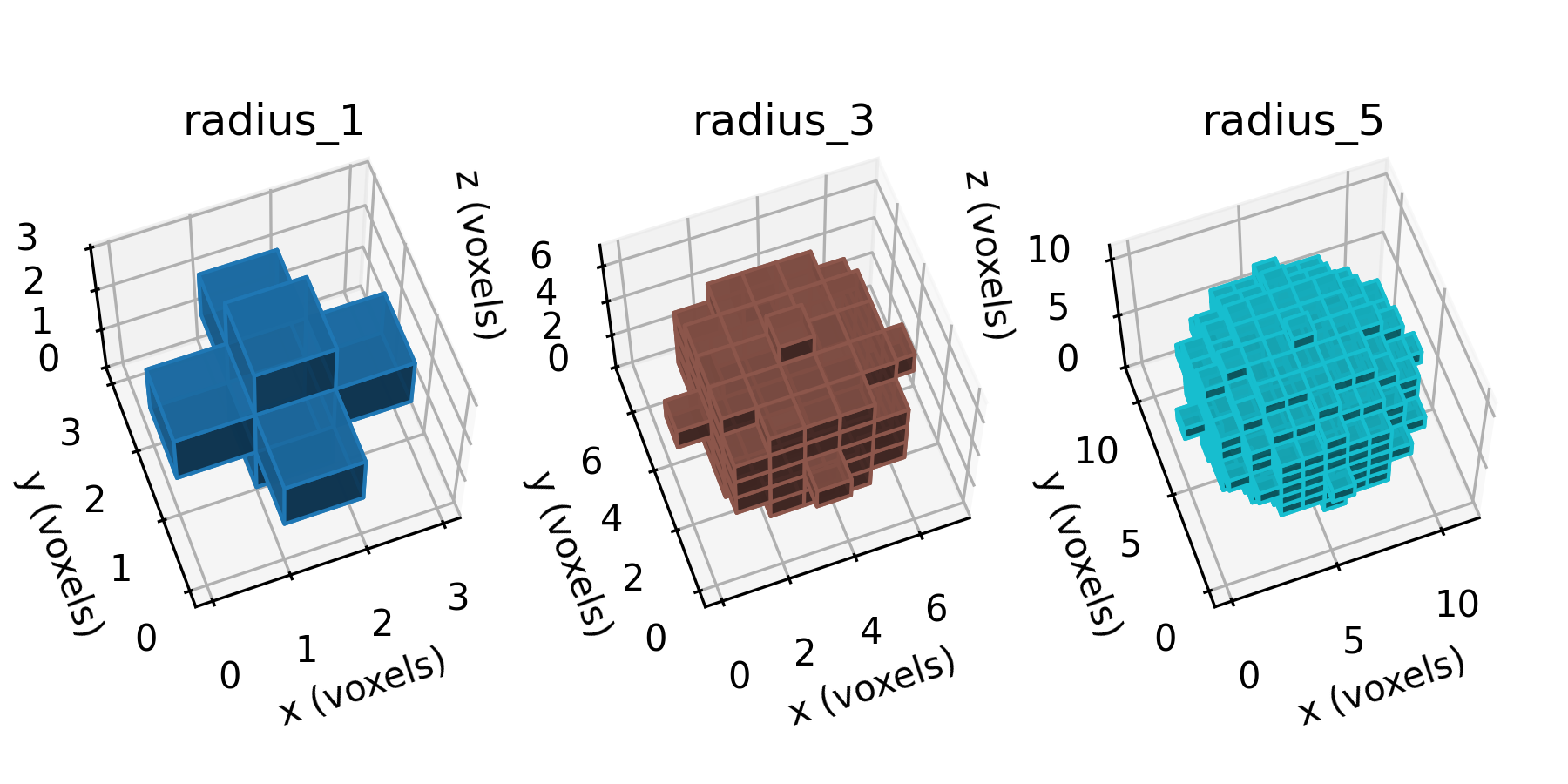
Figure 4.2-1: Sphere segmentations at selected resolutions, shown in the voxel domain.
The radius=1 case has the following data structure,
The radius_1 data structure
spheres["radius_1"]

array([[[0, 0, 0],
        [0, 1, 0],
        [0, 0, 0]],

       [[0, 1, 0],
        [1, 1, 1],
        [0, 1, 0]],

       [[0, 0, 0],
        [0, 1, 0],
        [0, 0, 0]]], dtype=uint8)
Because of large size, the data structures for sphere_3 and
sphere_5 are not shown here.
These segmentations are saved to
automesh
automesh is used to convert the .npy segmentations into .inp meshes.
The radius=1 command and output
automesh mesh hex -i spheres_radius_1.npy -o spheres_radius_1.inp
    automesh 0.5.1
     Reading spheres_radius_1.npy
        Done 23.615µs [2 materials, 27 voxels]
     Meshing voxels into hexahedra
        Done 17.587µs [27 elements, 64 nodes]
     Writing spheres_radius_1.inp
        Done 79.821µs
       Total 495.69µs
The radius=3 command and output
automesh mesh hex -i spheres_radius_3.npy -o spheres_radius_3.inp
    automesh 0.5.1
     Reading spheres_radius_3.npy
        Done 21.733µs [2 materials, 343 voxels]
     Meshing voxels into hexahedra
        Done 42.054µs [343 elements, 512 nodes]
     Writing spheres_radius_3.inp
        Done 160.353µs
       Total 601.691µs
The radius=5 command and output
automesh mesh hex -i spheres_radius_5.npy -o spheres_radius_5.inp
    automesh 0.5.1
     Reading spheres_radius_5.npy
        Done 21.373µs [2 materials, 1331 voxels]
     Meshing voxels into hexahedra
        Done 227.684µs [1331 elements, 1728 nodes]
     Writing spheres_radius_5.inp
        Done 462.64µs
       Total 1.112554ms
Mesh
The spheres_radius_1.inp file
*Heading
 conspire mesh
*Node
1, 0, 0, 0
2, 1, 0, 0
3, 2, 0, 0
4, 3, 0, 0
5, 0, 1, 0
6, 1, 1, 0
7, 2, 1, 0
8, 3, 1, 0
9, 0, 2, 0
10, 1, 2, 0
11, 2, 2, 0
12, 3, 2, 0
13, 0, 3, 0
14, 1, 3, 0
15, 2, 3, 0
16, 3, 3, 0
17, 0, 0, 1
18, 1, 0, 1
19, 2, 0, 1
20, 3, 0, 1
21, 0, 1, 1
22, 1, 1, 1
23, 2, 1, 1
24, 3, 1, 1
25, 0, 2, 1
26, 1, 2, 1
27, 2, 2, 1
28, 3, 2, 1
29, 0, 3, 1
30, 1, 3, 1
31, 2, 3, 1
32, 3, 3, 1
33, 0, 0, 2
34, 1, 0, 2
35, 2, 0, 2
36, 3, 0, 2
37, 0, 1, 2
38, 1, 1, 2
39, 2, 1, 2
40, 3, 1, 2
41, 0, 2, 2
42, 1, 2, 2
43, 2, 2, 2
44, 3, 2, 2
45, 0, 3, 2
46, 1, 3, 2
47, 2, 3, 2
48, 3, 3, 2
49, 0, 0, 3
50, 1, 0, 3
51, 2, 0, 3
52, 3, 0, 3
53, 0, 1, 3
54, 1, 1, 3
55, 2, 1, 3
56, 3, 1, 3
57, 0, 2, 3
58, 1, 2, 3
59, 2, 2, 3
60, 3, 2, 3
61, 0, 3, 3
62, 1, 3, 3
63, 2, 3, 3
64, 3, 3, 3
*Element, type=C3D8, elset=BLOCK1
1, 1, 2, 6, 5, 17, 18, 22, 21
2, 17, 18, 22, 21, 33, 34, 38, 37
3, 33, 34, 38, 37, 49, 50, 54, 53
4, 5, 6, 10, 9, 21, 22, 26, 25
5, 37, 38, 42, 41, 53, 54, 58, 57
6, 9, 10, 14, 13, 25, 26, 30, 29
7, 25, 26, 30, 29, 41, 42, 46, 45
8, 41, 42, 46, 45, 57, 58, 62, 61
9, 2, 3, 7, 6, 18, 19, 23, 22
10, 34, 35, 39, 38, 50, 51, 55, 54
11, 10, 11, 15, 14, 26, 27, 31, 30
12, 42, 43, 47, 46, 58, 59, 63, 62
13, 3, 4, 8, 7, 19, 20, 24, 23
14, 19, 20, 24, 23, 35, 36, 40, 39
15, 35, 36, 40, 39, 51, 52, 56, 55
16, 7, 8, 12, 11, 23, 24, 28, 27
17, 39, 40, 44, 43, 55, 56, 60, 59
18, 11, 12, 16, 15, 27, 28, 32, 31
19, 27, 28, 32, 31, 43, 44, 48, 47
20, 43, 44, 48, 47, 59, 60, 64, 63
*Element, type=C3D8, elset=BLOCK2
21, 21, 22, 26, 25, 37, 38, 42, 41
22, 18, 19, 23, 22, 34, 35, 39, 38
23, 6, 7, 11, 10, 22, 23, 27, 26
24, 22, 23, 27, 26, 38, 39, 43, 42
25, 38, 39, 43, 42, 54, 55, 59, 58
26, 26, 27, 31, 30, 42, 43, 47, 46
27, 23, 24, 28, 27, 39, 40, 44, 43
Because of large size, the mesh structures for sphere_3 and
sphere_5 are not shown here.
Source
spheres.py
spheres.py
r"""This module, spheres.py, creates a voxelized sphere and exports
it as a .npy file.

Example
-------
source ~/autotwin/automesh/.venv/bin/activate
cd book/examples/spheres
python spheres.py
"""

from pathlib import Path
from typing import Final

from matplotlib.colors import LightSource
import matplotlib.pyplot as plt
from mpl_toolkits.mplot3d import Axes3D
import numpy as np


def sphere(radius: int, dtype=np.uint8) -> np.ndarray:
    """Generate a 3D voxelized representation of a sphere.

    Parameters
    ----------
    radius: int
        The radius of the sphere.  Minimum value is 1.

    dtype: data-type, optional
        The data type of the output array.  Default is np.uint8.

    Returns
    -------
    np.ndarray
        A 3D numpy array of shape (2*radius+1, 2*radius+1, 2*radius+1)
        representing the voxelized sphere.  Voxels within the sphere are
        set to 1, and those outside are set to 0.

    Raises
    ------
    ValueError
        If the radius is less than 1.

    Example
    -------
    >>> sphere(radius=1) returns
        array(
            [
                [[0, 0, 0], [0, 1, 0], [0, 0, 0]],
                [[0, 1, 0], [1, 1, 1], [0, 1, 0]],
                [[0, 0, 0], [0, 1, 0], [0, 0, 0]]
            ],
            dtype=uint8
        )

    Reference
    ---------
    Adapted from:
    https://github.com/scikit-image/scikit-image/blob/v0.24.0/skimage/morphology/footprints.py#L763-L833
    """
    if radius < 1:
        raise ValueError("Radius must be >= 1")

    n_voxels_per_side = 2 * radius + 1
    vox_z, vox_y, vox_x = np.mgrid[
        -radius : radius : n_voxels_per_side * 1j,
        -radius : radius : n_voxels_per_side * 1j,
        -radius : radius : n_voxels_per_side * 1j,
    ]
    voxel_radius_squared = vox_x**2 + vox_y**2 + vox_z**2
    result = np.array(voxel_radius_squared <= radius * radius, dtype=dtype)
    return result


# User input begin

spheres = {
    "radius_1": sphere(radius=1),
    "radius_3": sphere(radius=3),
    "radius_5": sphere(radius=5),
}

aa = Path(__file__)
bb = aa.with_suffix(".png")

# Visualize the elements.
width, height = 10, 5
# width, height = 8, 4
# width, height = 6, 3
fig = plt.figure(figsize=(width, height))

el, az, roll = 63, -110, 0
cmap = plt.get_cmap(name="tab10")
# NUM_COLORS = len(spheres)
NUM_COLORS = 10  # consistent with tab10 color scheme
VOXEL_ALPHA: Final[float] = 0.9

colors = cmap(np.linspace(0, 1, NUM_COLORS))
lightsource = LightSource(azdeg=325, altdeg=45)  # azimuth, elevation
# lightsource = LightSource(azdeg=325, altdeg=90)  # azimuth, elevation
DPI: Final[int] = 300  # resolution, dots per inch
SHOW: Final[bool] = False  # turn to True to show the figure on screen
SAVE: Final[bool] = False  # turn to True to save .png and .npy files
# User input end


N_SUBPLOTS = len(spheres)
IDX = 1
for index, (key, value) in enumerate(spheres.items()):
    ax = fig.add_subplot(1, N_SUBPLOTS, index + 1, projection=Axes3D.name)
    ax.voxels(
        value,
        facecolors=colors[index],
        edgecolor=colors[index],
        alpha=VOXEL_ALPHA,
        lightsource=lightsource,
    )
    ax.set_title(key.replace("_", "="))
    IDX += 1

    # Set labels for the axes
    ax.set_xlabel("x (voxels)")
    ax.set_ylabel("y (voxels)")
    ax.set_zlabel("z (voxels)")

    # Set the camera view
    ax.set_aspect("equal")
    ax.view_init(elev=el, azim=az, roll=roll)

    if SAVE:
        cc = aa.with_stem("spheres_" + key)
        dd = cc.with_suffix(".npy")
        # Save the data in .npy format
        np.save(dd, value)
        print(f"Saved: {dd}")

fig.tight_layout()
if SHOW:
    plt.show()

if SAVE:
    fig.savefig(bb, dpi=DPI, bbox_inches="tight")
    print(f"Saved: {bb}")
test_spheres.py
test_spheres.py
r"""This module, test_spheres.py, performs point testing of the sphere module.

Example
-------
source ~/autotwin/automesh/.venv/bin/activate
python -m pytest book/examples/spheres/test_spheres.py
"""

import numpy as np
import pytest

import spheres as sph


def test_sphere():
    """Unit tests for the sphere function."""

    # Assure that radius >=1 assert is raised
    with pytest.raises(ValueError, match="Radius must be >= 1"):
        sph.sphere(radius=0)

    #  Assure radius=1 is correct
    gold_r1 = np.array(
        [
            [[0, 0, 0], [0, 1, 0], [0, 0, 0]],
            [[0, 1, 0], [1, 1, 1], [0, 1, 0]],
            [[0, 0, 0], [0, 1, 0], [0, 0, 0]],
        ],
        dtype=np.uint8,
    )

    result_r1 = sph.sphere(radius=1)
    assert np.all(gold_r1 == result_r1)

    #  Assure radius=2 is correct
    gold_r2 = np.array(
        [
            [
                [0, 0, 0, 0, 0],
                [0, 0, 0, 0, 0],
                [0, 0, 1, 0, 0],
                [0, 0, 0, 0, 0],
                [0, 0, 0, 0, 0],
            ],
            [
                [0, 0, 0, 0, 0],
                [0, 1, 1, 1, 0],
                [0, 1, 1, 1, 0],
                [0, 1, 1, 1, 0],
                [0, 0, 0, 0, 0],
            ],
            [
                [0, 0, 1, 0, 0],
                [0, 1, 1, 1, 0],
                [1, 1, 1, 1, 1],
                [0, 1, 1, 1, 0],
                [0, 0, 1, 0, 0],
            ],
            [
                [0, 0, 0, 0, 0],
                [0, 1, 1, 1, 0],
                [0, 1, 1, 1, 0],
                [0, 1, 1, 1, 0],
                [0, 0, 0, 0, 0],
            ],
            [
                [0, 0, 0, 0, 0],
                [0, 0, 0, 0, 0],
                [0, 0, 1, 0, 0],
                [0, 0, 0, 0, 0],
                [0, 0, 0, 0, 0],
            ],
        ],
        dtype=np.uint8,
    )

    result_r2 = sph.sphere(radius=2)
    assert np.all(gold_r2 == result_r2)

    #  Assure radius=3 is correct
    gold_r3 = np.array(
        [
            [
                [0, 0, 0, 0, 0, 0, 0],
                [0, 0, 0, 0, 0, 0, 0],
                [0, 0, 0, 0, 0, 0, 0],
                [0, 0, 0, 1, 0, 0, 0],
                [0, 0, 0, 0, 0, 0, 0],
                [0, 0, 0, 0, 0, 0, 0],
                [0, 0, 0, 0, 0, 0, 0],
            ],
            [
                [0, 0, 0, 0, 0, 0, 0],
                [0, 0, 1, 1, 1, 0, 0],
                [0, 1, 1, 1, 1, 1, 0],
                [0, 1, 1, 1, 1, 1, 0],
                [0, 1, 1, 1, 1, 1, 0],
                [0, 0, 1, 1, 1, 0, 0],
                [0, 0, 0, 0, 0, 0, 0],
            ],
            [
                [0, 0, 0, 0, 0, 0, 0],
                [0, 1, 1, 1, 1, 1, 0],
                [0, 1, 1, 1, 1, 1, 0],
                [0, 1, 1, 1, 1, 1, 0],
                [0, 1, 1, 1, 1, 1, 0],
                [0, 1, 1, 1, 1, 1, 0],
                [0, 0, 0, 0, 0, 0, 0],
            ],
            [
                [0, 0, 0, 1, 0, 0, 0],
                [0, 1, 1, 1, 1, 1, 0],
                [0, 1, 1, 1, 1, 1, 0],
                [1, 1, 1, 1, 1, 1, 1],
                [0, 1, 1, 1, 1, 1, 0],
                [0, 1, 1, 1, 1, 1, 0],
                [0, 0, 0, 1, 0, 0, 0],
            ],
            [
                [0, 0, 0, 0, 0, 0, 0],
                [0, 1, 1, 1, 1, 1, 0],
                [0, 1, 1, 1, 1, 1, 0],
                [0, 1, 1, 1, 1, 1, 0],
                [0, 1, 1, 1, 1, 1, 0],
                [0, 1, 1, 1, 1, 1, 0],
                [0, 0, 0, 0, 0, 0, 0],
            ],
            [
                [0, 0, 0, 0, 0, 0, 0],
                [0, 0, 1, 1, 1, 0, 0],
                [0, 1, 1, 1, 1, 1, 0],
                [0, 1, 1, 1, 1, 1, 0],
                [0, 1, 1, 1, 1, 1, 0],
                [0, 0, 1, 1, 1, 0, 0],
                [0, 0, 0, 0, 0, 0, 0],
            ],
            [
                [0, 0, 0, 0, 0, 0, 0],
                [0, 0, 0, 0, 0, 0, 0],
                [0, 0, 0, 0, 0, 0, 0],
                [0, 0, 0, 1, 0, 0, 0],
                [0, 0, 0, 0, 0, 0, 0],
                [0, 0, 0, 0, 0, 0, 0],
                [0, 0, 0, 0, 0, 0, 0],
            ],
        ],
        dtype=np.uint8,
    )

    result_r3 = sph.sphere(radius=3)
    assert np.all(gold_r3 == result_r3)