Remesh example: unit sphere
This worked example applies remesh to an analytic unit sphere
(radius ≈ 1). Because a sphere has nearly constant curvature, uniform and
adaptive sizing produce almost the same result here — a useful baseline before
the Stanford bunny, where they differ.
The input mesh
⬇ Download the example mesh: sphere_radius_1.stl
(binary format, 54 kB)
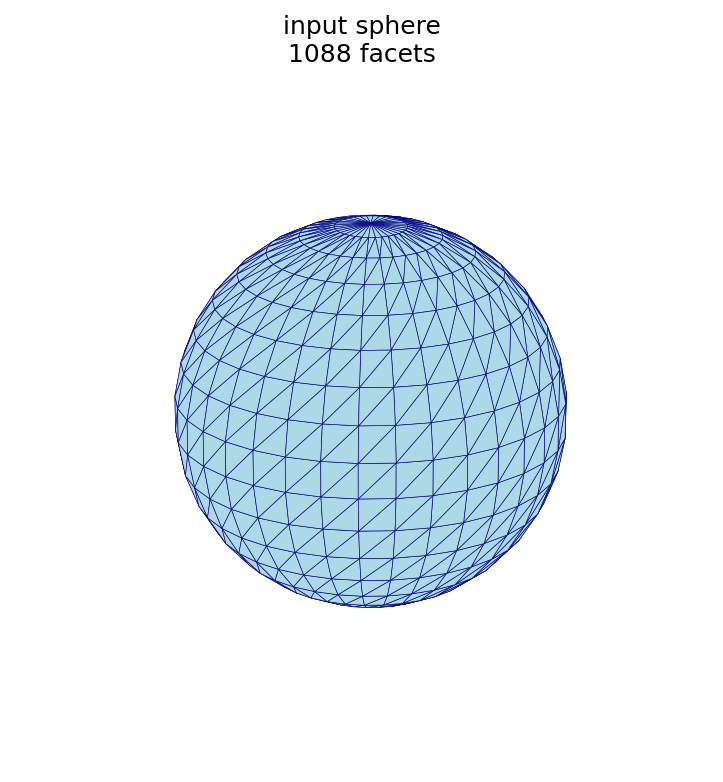
Statistics
| quantity | symbol | value |
|---|---|---|
| facets (triangles) | 1,088 | |
| points (vertices) | 546 | |
| edges | 1,632 |
The mean triangle edge length is 0.178, and most edges cluster near it (see the edge-length histogram in the next section).
Relationship to triangular subdivision
The Subdivision section gives the recursive relationships for one refinement of a closed triangular mesh:
These relationships preserve two invariants of any closed triangular surface, both of which the example sphere satisfies:
- Edge–face relationship, : every triangle has three edges and every edge is shared by two triangles, so . ✓
- Euler characteristic, for a genus-0 (sphere-like) surface: . ✓
These statistics, and the histograms below, are produced by the figure script at the end of this page.
Default remesh
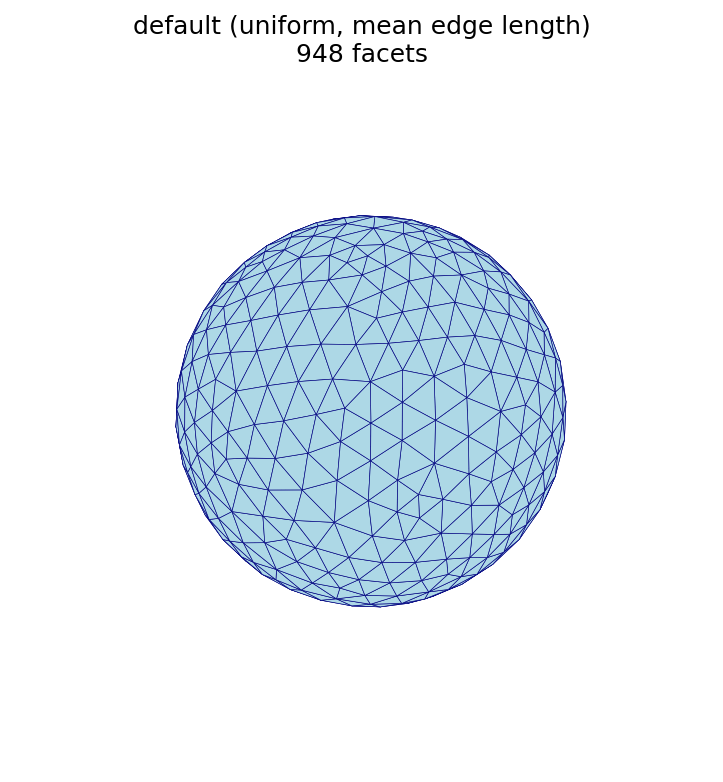
Running remesh with no mode or size uses uniform sizing at the mean edge
length of the input, which regularizes the surface at its existing resolution:
the triangles become more uniform in size and shape while the facet count stays
close to the input.
automesh remesh -i sphere_radius_1.stl -o sphere_default.stl
| base (1,088 facets) | default (948 facets) |
|---|---|
|  |
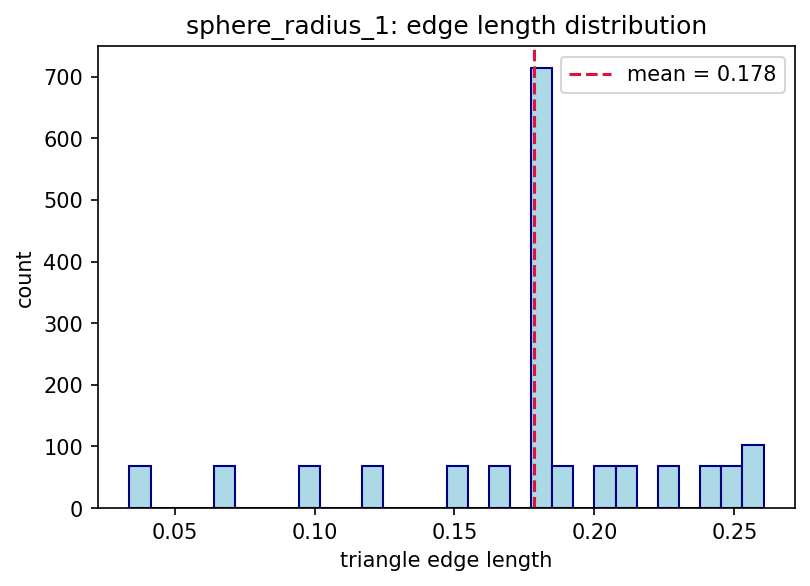 | 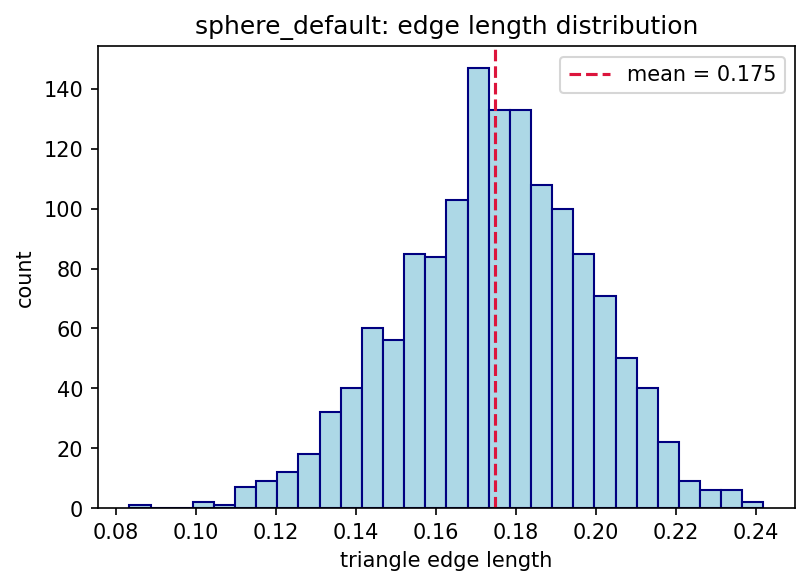 |
The histograms show the effect of remeshing on triangle edge lengths: the base mesh has an irregular, spiky distribution, while the default remesh produces a tighter, bell-shaped distribution centered near the mean edge length.
Uniform sizing: coarse vs. fine
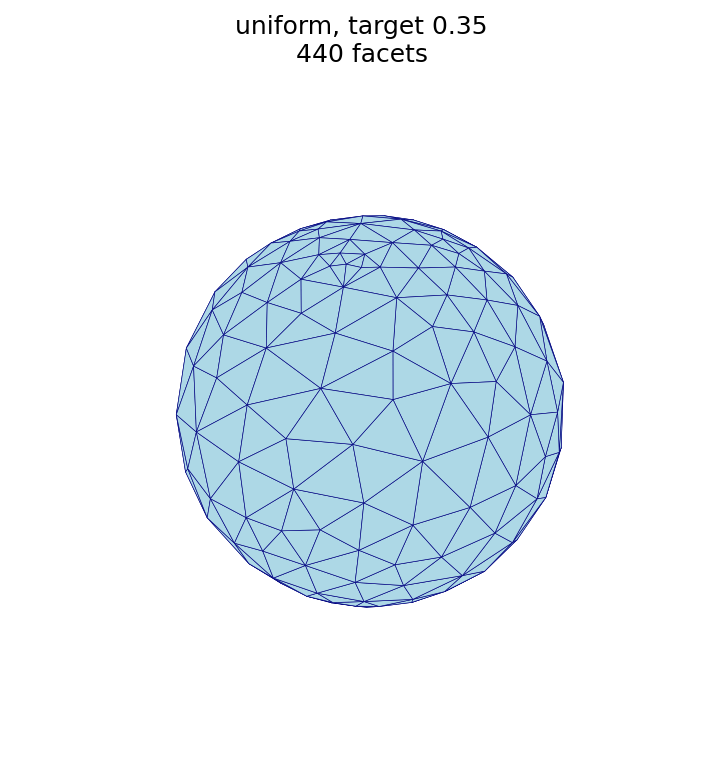
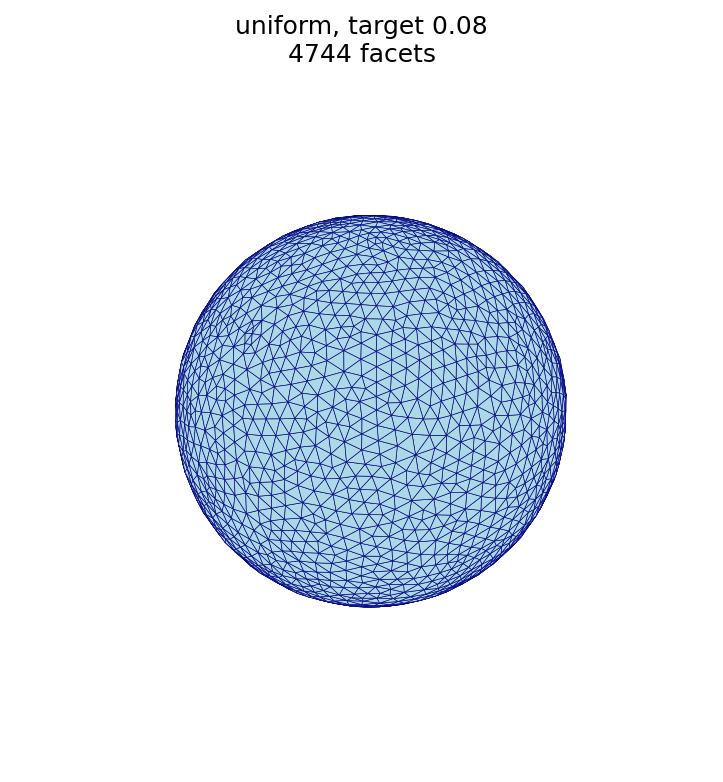
A larger target edge length produces fewer, larger triangles; a smaller target edge length produces many more, smaller triangles.
automesh remesh -i sphere_radius_1.stl -o sphere_uniform_coarse.stl uniform -s 0.35
automesh remesh -i sphere_radius_1.stl -o sphere_uniform_fine.stl   uniform -s 0.08
| base (1,088 facets) | coarse, -s 0.35 (440 facets) | fine, -s 0.08 (4,744 facets) |
|---|---|---|
|  |  |
Effect of the number of iterations
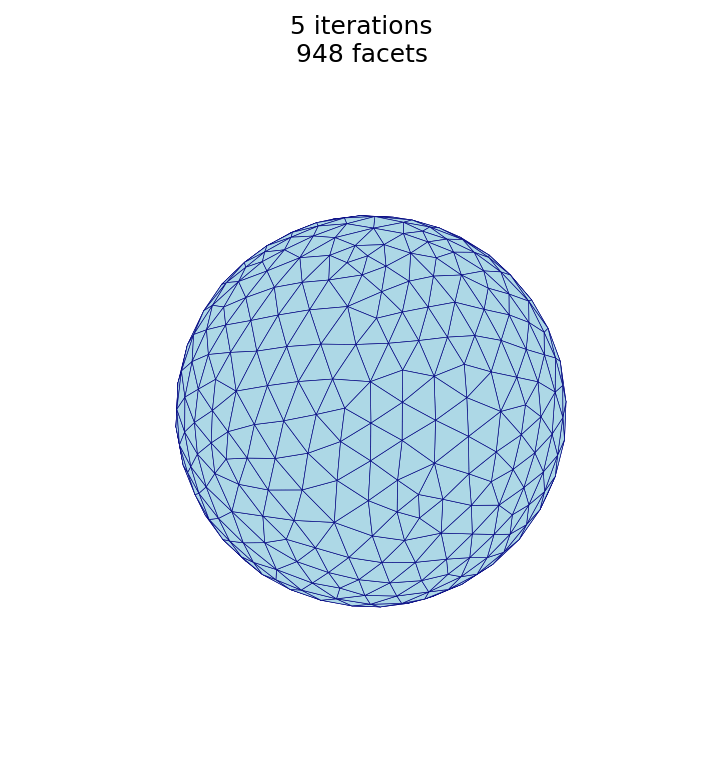
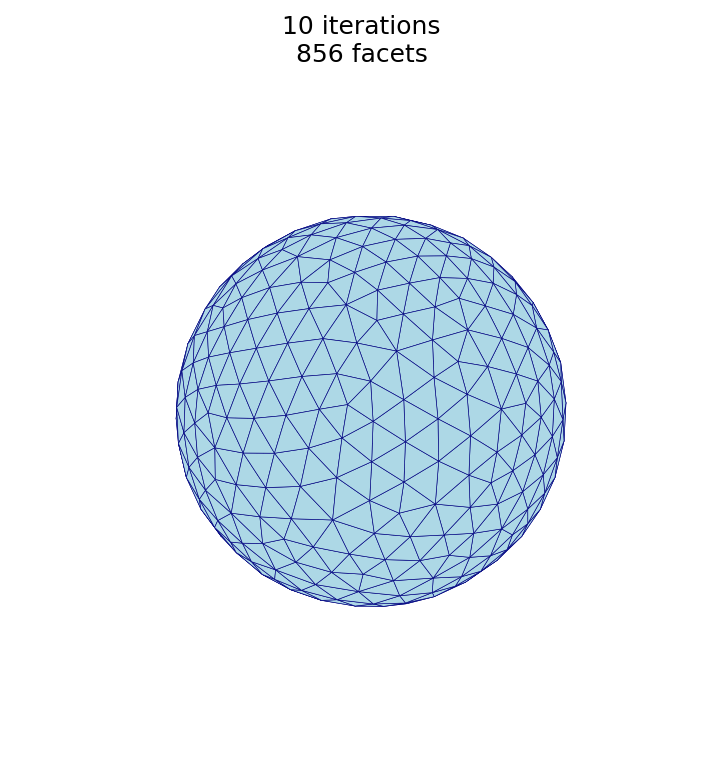
More iterations make the triangles more uniform, but with strongly diminishing
returns. The sphere is remeshed at the default target edge length for a range of
--iterations values, one output per value:
automesh remesh -i sphere_radius_1.stl -o sphere_n1.stl   uniform -n 1
automesh remesh -i sphere_radius_1.stl -o sphere_n5.stl   uniform -n 5
automesh remesh -i sphere_radius_1.stl -o sphere_n10.stl  uniform -n 10
automesh remesh -i sphere_radius_1.stl -o sphere_n20.stl  uniform -n 20
automesh remesh -i sphere_radius_1.stl -o sphere_n50.stl  uniform -n 50
automesh remesh -i sphere_radius_1.stl -o sphere_n100.stl uniform -n 100
Measuring the edge-length coefficient of variation of each result (CoV , smaller is more uniform) gives:
iterations -n | facets | mean edge | CoV |
|---|---|---|---|
| 1 | 1,380 | 0.154 | 26.6% |
| 5 (default) | 948 | 0.175 | 13.4% |
| 10 | 856 | 0.183 | 9.8% |
| 20 | 846 | 0.184 | 9.7% |
| 50 | 838 | 0.185 | 9.6% |
| 100 | 830 | 0.186 | 9.6% |
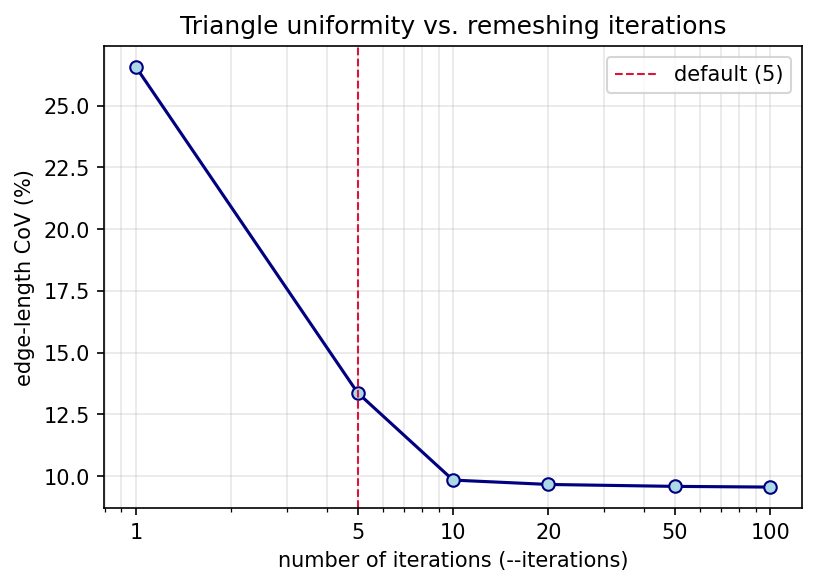
Most of the improvement happens within the first ~10 passes; beyond that the CoV
plateaus at an irreducible floor (≈ 9.6% here — a sphere cannot be tiled with
perfectly equal edges), so additional iterations cost time without making the
triangles measurably more uniform. For this mesh, -n 10 to -n 20 is a
practical sweet spot.
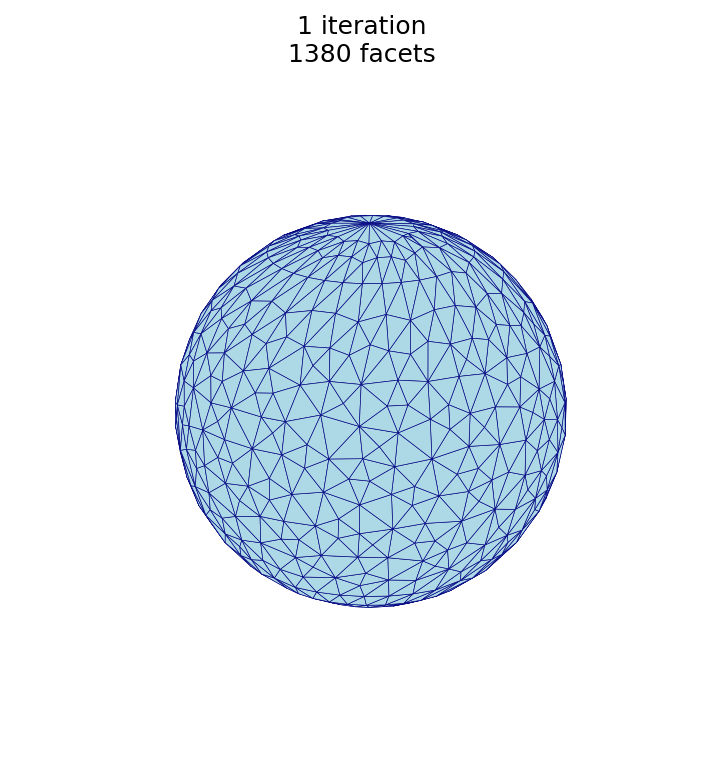
The same trend is visible in the meshes themselves — the triangulation grows more regular from 1 to 10 iterations:
-n 1 (1,380 facets) | -n 5 (948 facets) | -n 10 (856 facets) |
|---|---|---|
 |  |  |
This study is produced by the
remesh_iterations.py script shown at the end of the
page.
Uniform vs. adaptive
automesh remesh -i sphere_radius_1.stl -o sphere_uniform.stl  uniform  -s 0.18
automesh remesh -i sphere_radius_1.stl -o sphere_adaptive.stl adaptive --minimum 0.05 --maximum 0.30
uniform, -s 0.18 (910 facets) | adaptive, 0.05–0.30 (458 facets) |
|---|---|
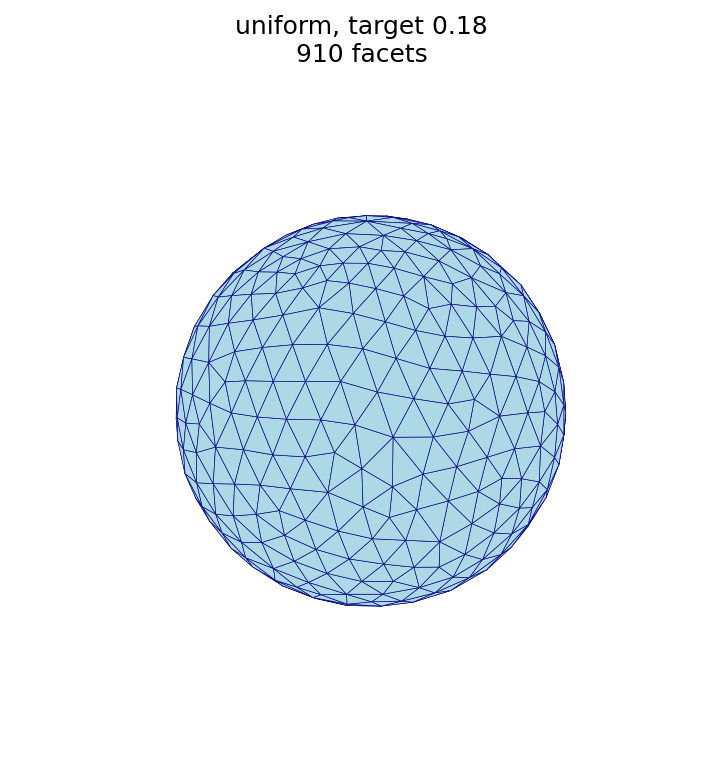 | 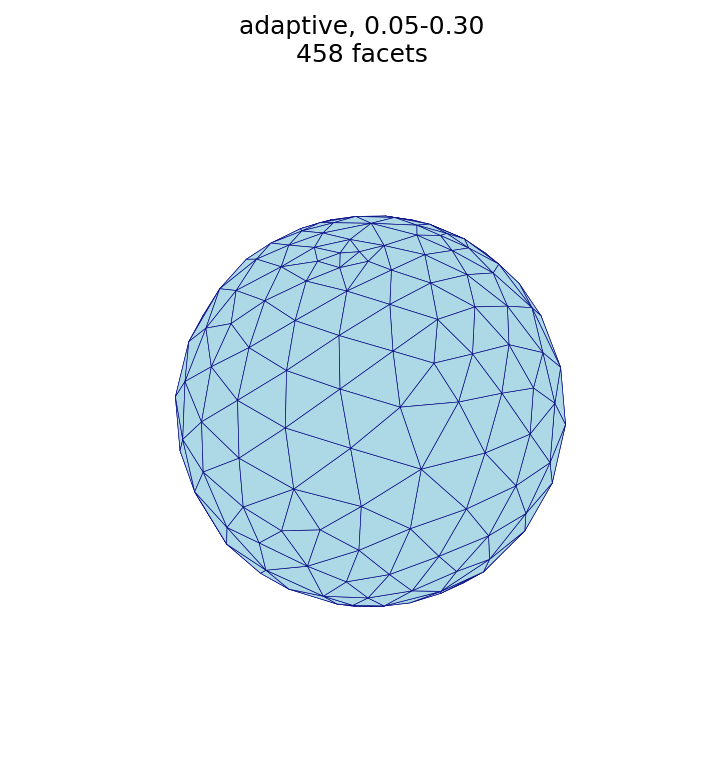 |
Note. A sphere has (nearly) constant curvature, so curvature-adaptive sizing produces an almost uniform result here — the two meshes above look similar. On a model with varying curvature (sharp features together with flat regions), adaptive sizing refines the high-curvature regions and coarsens the flat ones, which uniform sizing cannot do. See the Stanford bunny example for a mesh where uniform and adaptive sizing differ visibly.
Figure script
The figures on this page are produced by the following script, which reads each STL surface and renders it with a matched camera.
r"""This module, remesh_figures.py, renders the surface triangulations used in
the Remesh section of the documentation.  It reads the input sphere and each
remeshed output (produced by `automesh remesh`) and saves a matched-camera PNG
of every mesh, so the effect of uniform and adaptive sizing can be compared
side by side.

Example
-------
source ~/autotwin/automesh/.venv/bin/activate
cd ~/autotwin/automesh/book/cli
# regenerate the remeshed STL files (binary STL) if needed:
#   automesh remesh -i sphere_radius_1.stl -o sphere_uniform_coarse.stl uniform -s 0.35
#   automesh remesh -i sphere_radius_1.stl -o sphere_uniform_fine.stl   uniform -s 0.08
#   automesh remesh -i sphere_radius_1.stl -o sphere_uniform.stl        uniform -s 0.18
#   automesh remesh -i sphere_radius_1.stl -o sphere_adaptive.stl       adaptive --minimum 0.05 --maximum 0.30
python remesh_figures.py

Output
------
The `*.png` visualization files, one per mesh, written next to this script.
"""

# standard library
import struct
from pathlib import Path
from typing import Final

# third-party library
import matplotlib.pyplot as plt
from mpl_toolkits.mplot3d.art3d import Poly3DCollection
import numpy as np
from numpy.typing import NDArray

# Shared view so triangle-size differences (not camera changes) are what the
# reader sees between figures.
ELEV: Final[float] = 20.0
AZIM: Final[float] = -60.0
LIMIT: Final[float] = 1.05  # sphere radius ~1, small margin
FACECOLOR: Final[str] = "lightblue"
EDGECOLOR: Final[str] = "navy"


def read_stl(path: Path) -> NDArray[np.float64]:
    """Reads triangular facets from an STL file, returning an array of shape
    (n_facets, 3, 3).  Binary and ASCII STL are both supported; the format is
    detected by sniffing the leading bytes."""
    data = path.read_bytes()
    is_ascii = data[:6].lower().startswith(b"solid") and b"facet" in data[:512]
    if is_ascii:
        return _read_ascii(data.decode("ascii", errors="replace"))
    return _read_binary(data)


def _read_binary(data: bytes) -> NDArray[np.float64]:
    """Reads a binary STL (80-byte header, uint32 count, 50 bytes per facet)."""
    (n_facets,) = struct.unpack_from("<I", data, 80)
    facets = np.empty((n_facets, 3, 3), dtype=np.float64)
    offset = 84
    for i in range(n_facets):
        # 12 floats: normal (3) + three vertices (9); trailing uint16 attribute.
        values = struct.unpack_from("<12f", data, offset)
        facets[i] = np.array(values[3:12]).reshape(3, 3)
        offset += 50
    return facets


def _read_ascii(text: str) -> NDArray[np.float64]:
    """Reads an ASCII STL, collecting every `vertex` triple into facets."""
    verts = []
    for line in text.splitlines():
        tokens = line.split()
        if tokens and tokens[0] == "vertex":
            verts.append([float(v) for v in tokens[1:4]])
    return np.array(verts, dtype=np.float64).reshape(-1, 3, 3)


def topology(facets: NDArray[np.float64]) -> tuple[int, int, int]:
    """Returns (faces, edges, vertices) for a triangular surface mesh, where
    coincident vertices are merged and each undirected edge is counted once."""
    faces = len(facets)
    keyed = np.round(facets.reshape(-1, 3), 6)
    _, inverse = np.unique(keyed, axis=0, return_inverse=True)
    ids = inverse.reshape(faces, 3)
    edges = set()
    for a, b, c in ids:
        for u, v in ((a, b), (b, c), (c, a)):
            edges.add((int(min(u, v)), int(max(u, v))))
    vertices = int(ids.max()) + 1
    return faces, len(edges), vertices


def edge_lengths(facets: NDArray[np.float64]) -> NDArray[np.float64]:
    """Returns the length of every unique undirected edge in the mesh."""
    keyed = np.round(facets.reshape(-1, 3), 6)
    coords, inverse = np.unique(keyed, axis=0, return_inverse=True)
    ids = inverse.reshape(len(facets), 3)
    seen = set()
    lengths = []
    for tri, (a, b, c) in zip(facets, ids):
        for (u, v), (p, q) in (((a, b), (0, 1)), ((b, c), (1, 2)), ((c, a), (2, 0))):
            key = (int(min(u, v)), int(max(u, v)))
            if key not in seen:
                seen.add(key)
                lengths.append(float(np.linalg.norm(tri[p] - tri[q])))
    return np.array(lengths)


def render_histogram(stl: Path, out_name: str) -> None:
    """Saves a histogram of the triangle edge lengths of the given mesh."""
    lengths = edge_lengths(read_stl(stl))
    fig, ax = plt.subplots(figsize=(6, 4))
    ax.hist(lengths, bins=30, color=FACECOLOR, edgecolor=EDGECOLOR)
    ax.axvline(
        lengths.mean(),
        color="crimson",
        linestyle="--",
        linewidth=1.5,
        label=f"mean = {lengths.mean():.3f}",
    )
    ax.set_xlabel("triangle edge length")
    ax.set_ylabel("count")
    ax.set_title(f"{stl.stem}: edge length distribution")
    ax.legend()
    png = stl.with_name(out_name)
    fig.savefig(png, dpi=150, bbox_inches="tight")
    plt.close(fig)
    print(f"wrote {png.name} ({len(lengths)} edges)")


def render(stl: Path, title: str) -> None:
    """Renders a single STL surface triangulation to a PNG next to it."""
    facets = read_stl(stl)
    fig = plt.figure(figsize=(6, 6))
    ax = fig.add_subplot(111, projection="3d")
    surface = Poly3DCollection(
        facets, facecolor=FACECOLOR, edgecolor=EDGECOLOR, linewidths=0.3, alpha=1.0
    )
    ax.add_collection3d(surface)
    ax.set_xlim(-LIMIT, LIMIT)
    ax.set_ylim(-LIMIT, LIMIT)
    ax.set_zlim(-LIMIT, LIMIT)
    ax.set_box_aspect((1, 1, 1))
    ax.view_init(elev=ELEV, azim=AZIM)
    ax.set_axis_off()
    ax.set_title(f"{title}\n{len(facets)} facets", fontsize=12)
    png = stl.with_suffix(".png")
    fig.savefig(png, dpi=150, bbox_inches="tight")
    plt.close(fig)
    print(f"wrote {png.name} ({len(facets)} facets)")


def main() -> None:
    here = Path(__file__).resolve().parent
    figures = {
        "sphere_radius_1": "input sphere",
        "sphere_n1": "1 iteration",
        "sphere_n5": "5 iterations",
        "sphere_n10": "10 iterations",
        "sphere_default": "default (uniform, mean edge length)",
        "sphere_uniform_coarse": "uniform, target 0.35",
        "sphere_uniform_fine": "uniform, target 0.08",
        "sphere_uniform": "uniform, target 0.18",
        "sphere_adaptive": "adaptive, 0.05-0.30",
    }
    for stem, title in figures.items():
        stl = here / f"{stem}.stl"
        if stl.exists():
            render(stl, title)
        else:
            print(f"skipping {stl.name} (not found)")

    # Edge-length histograms and topology summary for the base and default meshes.
    histograms = {
        "sphere_radius_1": "sphere_edge_histogram.png",
        "sphere_default": "sphere_default_histogram.png",
    }
    for stem, out_name in histograms.items():
        stl = here / f"{stem}.stl"
        if stl.exists():
            render_histogram(stl, out_name)
            faces, edges, vertices = topology(read_stl(stl))
            print(
                f"{stl.name}: F={faces} E={edges} V={vertices} "
                f"(V - E + F = {vertices - edges + faces})"
            )


if __name__ == "__main__":
    main()
Iteration study script
The effect-of-iterations table and plot
are produced by the following script, which remeshes the sphere at several
--iterations values and measures the edge-length coefficient of variation:
r"""This module, remesh_iterations.py, studies how the number of remeshing
iterations affects triangle uniformity.  It remeshes the example sphere at the
default target edge length (mean edge length) for a range of `--iterations`
values, measures the edge-length coefficient of variation (CoV = std / mean) of
each result, and plots CoV versus the number of iterations.

Example
-------
source ~/autotwin/automesh/.venv/bin/activate
cd ~/autotwin/automesh/book/cli
# `automesh` must be on the PATH (e.g. target/release)
python remesh_iterations.py

Output
------
The `sphere_iterations.png` plot, written next to this script, and a summary
table printed to the terminal.
"""

import os
import shutil
import struct
import subprocess
import tempfile
from pathlib import Path

import matplotlib.pyplot as plt
import numpy as np
from numpy.typing import NDArray

ITERATIONS = [1, 5, 10, 20, 50, 100]
FACECOLOR = "lightblue"
EDGECOLOR = "navy"


def automesh_binary() -> str:
    """Locates the `automesh` executable: the AUTOMESH environment variable, then
    the PATH, then the repository's target/release build."""
    candidate = os.environ.get("AUTOMESH") or shutil.which("automesh")
    if candidate:
        return candidate
    fallback = Path(__file__).resolve().parents[2] / "target" / "release" / "automesh"
    if fallback.exists():
        return str(fallback)
    raise FileNotFoundError(
        "could not find `automesh`; set AUTOMESH or add it to the PATH"
    )


def read_stl(path: Path) -> NDArray[np.float64]:
    """Reads triangular facets from a binary STL file."""
    data = path.read_bytes()
    (n_facets,) = struct.unpack_from("<I", data, 80)
    facets = np.empty((n_facets, 3, 3), dtype=np.float64)
    offset = 84
    for i in range(n_facets):
        values = struct.unpack_from("<12f", data, offset)
        facets[i] = np.array(values[3:12]).reshape(3, 3)
        offset += 50
    return facets


def edge_lengths(facets: NDArray[np.float64]) -> NDArray[np.float64]:
    """Returns the length of every unique undirected edge in the mesh."""
    keyed = np.round(facets.reshape(-1, 3), 6)
    _, inverse = np.unique(keyed, axis=0, return_inverse=True)
    ids = inverse.reshape(len(facets), 3)
    seen = set()
    lengths = []
    for tri, (a, b, c) in zip(facets, ids):
        for (u, v), (p, q) in (((a, b), (0, 1)), ((b, c), (1, 2)), ((c, a), (2, 0))):
            key = (int(min(u, v)), int(max(u, v)))
            if key not in seen:
                seen.add(key)
                lengths.append(float(np.linalg.norm(tri[p] - tri[q])))
    return np.array(lengths)


def main() -> None:
    here = Path(__file__).resolve().parent
    source = here / "sphere_radius_1.stl"
    automesh = automesh_binary()
    covs, facet_counts = [], []
    print(f"{'n':>4} {'facets':>7} {'mean':>7} {'CoV%':>6}")
    with tempfile.TemporaryDirectory() as tmp:
        for n in ITERATIONS:
            out = Path(tmp) / f"n{n}.stl"
            subprocess.run(
                [automesh, "remesh", "-i", str(source), "-o", str(out),
                 "uniform", "-n", str(n)],
                check=True, capture_output=True,
            )
            facets = read_stl(out)
            lengths = edge_lengths(facets)
            cov = 100.0 * lengths.std() / lengths.mean()
            covs.append(cov)
            facet_counts.append(len(facets))
            print(f"{n:>4} {len(facets):>7} {lengths.mean():>7.4f} {cov:>6.1f}")

    fig, ax = plt.subplots(figsize=(6, 4))
    ax.plot(ITERATIONS, covs, "o-", color=EDGECOLOR, markerfacecolor=FACECOLOR)
    ax.set_xscale("log")
    ax.set_xticks(ITERATIONS)
    ax.get_xaxis().set_major_formatter(plt.ScalarFormatter())
    ax.set_xlabel("number of iterations (--iterations)")
    ax.set_ylabel("edge-length CoV (%)")
    ax.set_title("Triangle uniformity vs. remeshing iterations")
    ax.axvline(5, color="crimson", linestyle="--", linewidth=1.0, label="default (5)")
    ax.legend()
    ax.grid(True, which="both", alpha=0.3)
    png = here / "sphere_iterations.png"
    fig.savefig(png, dpi=150, bbox_inches="tight")
    plt.close(fig)
    print(f"wrote {png.name}")


if __name__ == "__main__":
    main()
Converting ASCII STL to binary STL
remesh requires binary STL for both input and output. If your surface is an
ASCII STL, the following script converts it to binary STL:
r"""This module, ascii_to_binary_stl.py, converts an ASCII STL file into a
binary STL file.  `automesh remesh` requires binary STL for both input and
output; ASCII STL is not accepted.

Example
-------
source ~/autotwin/automesh/.venv/bin/activate
cd ~/autotwin/automesh/book/cli
python ascii_to_binary_stl.py input_ascii.stl output_binary.stl
"""

import struct
import sys
from pathlib import Path


def ascii_to_binary_stl(source: Path, target: Path) -> None:
    """Reads an ASCII STL and writes an equivalent binary STL."""
    normal = (0.0, 0.0, 0.0)
    verts: list[tuple[float, float, float]] = []
    facets: list[tuple] = []
    for line in source.read_text().splitlines():
        tokens = line.split()
        if not tokens:
            continue
        if tokens[0] == "facet" and tokens[1] == "normal":
            normal = tuple(float(x) for x in tokens[2:5])
            verts = []
        elif tokens[0] == "vertex":
            verts.append(tuple(float(x) for x in tokens[1:4]))
        elif tokens[0] == "endfacet":
            facets.append((normal, verts[0], verts[1], verts[2]))

    with target.open("wb") as out:
        out.write(b"\0" * 80)  # 80-byte header (ignored)
        out.write(struct.pack("<I", len(facets)))  # facet count
        for n, a, b, c in facets:
            # 12 floats (normal + 3 vertices) then a 2-byte attribute count.
            out.write(struct.pack("<12fH", *n, *a, *b, *c, 0))
    print(f"wrote {len(facets)} facets to {target}")


if __name__ == "__main__":
    if len(sys.argv) != 3:
        sys.exit("usage: python ascii_to_binary_stl.py <ascii.stl> <binary.stl>")
    ascii_to_binary_stl(Path(sys.argv[1]), Path(sys.argv[2]))
Run it as:
python ascii_to_binary_stl.py input_ascii.stl output_binary.stl