Mesh example: Remeshed Unit Sphere
The Torus example builds an all-hexahedral mesh directly from a
segmentation, one hexahedron per voxel. Here we take the other route into
mesh hex: its tessellation input. Given a triangular surface mesh,
mesh hex fills the enclosed volume with hexahedra by octree dualization.
The surface we start from is the remeshed unit sphere from the
Remesh: Unit Sphere example — specifically its -n 10
output, a clean, near-uniform triangulation of 856 facets. This example
turns that triangular surface into a solid all-hexahedral volume.
Downloadable Files
| file | description |
|---|---|
| sphere_n10.stl | The remeshed triangular sphere surface (856 facets), the input to dualization (see Preparing the Surface). |
| sphere_hex.inp | The all-hexahedral mesh produced from it (see Dualizing to Hexahedra). |
Preparing the Surface
sphere_n10.stl is reproduced here by running the -n 10 uniform remesh
from the Remesh: Unit Sphere example on its
sphere_radius_1.stl input:
The remesh command
automesh remesh -i sphere_radius_1.stl -o sphere_n10.stl uniform -n 10
Dualizing to Hexahedra
mesh hex on a tessellation converts the surface into a solid hexahedral
mesh. The --scale option sets the octree refinement depth — how finely
the bounding box is subdivided before the surface is captured:
The mesh hex command and output
automesh mesh hex -i sphere_n10.stl -o sphere_hex.inp --scale 8
    automesh 0.5.1
     Reading sphere_n10.stl
        Done 173.813µs
     Meshing hexahedra adaptively
        Done 13.005419ms [203 elements, 360 nodes]
   Buffering hexahedra onto geometry
        Done 375.978306ms [473 elements, 632 nodes]
     Writing sphere_hex.inp
        Done 349.189µs
       Total 390.105002ms
| triangular surface (856 facets) | all-hexahedral (393 elements) |
|---|---|
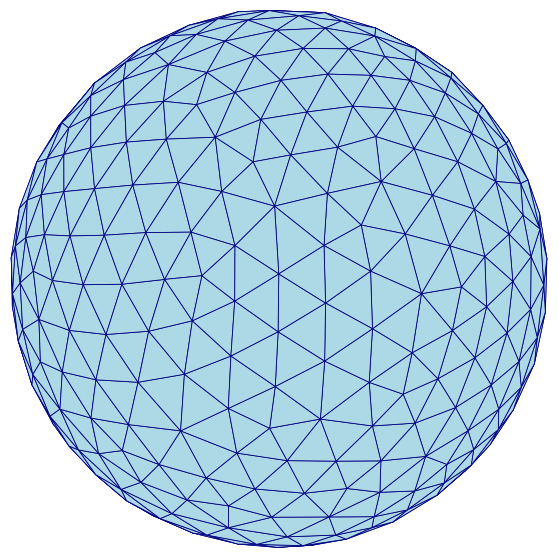 | 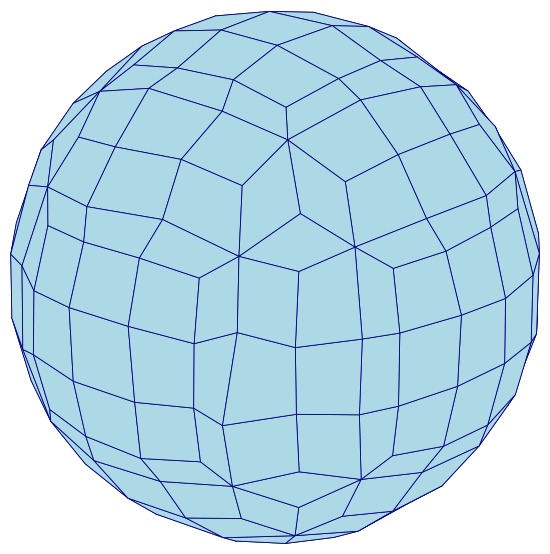 |
Figure 4.7-1: The remeshed triangular surface (left) and the solid all-hexahedral volume dualized from it (right). The surface only bounds the sphere; the hex mesh fills its interior.
Choosing --scale
Unlike the segmentation route, the tessellation route does not have a
natural element size baked into the input, so --scale matters — and its
effect on element quality is not monotonic. Sweeping it, and checking
the minimum scaled Jacobian with metrics, gives:
--scale | elements | min scaled Jacobian | mean scaled Jacobian |
|---|---|---|---|
| 3 (default) | 7 | — | — |
| 6 | 183 | 0.058 | 0.633 |
| 7 | 235 | 0.058 | 0.728 |
| 8 | 393 | 0.280 | 0.766 |
| 9 | 551 | 0.009 | 0.783 |
| 10 | 804 | -0.165 | 0.772 |
At the default --scale 3, the octree barely subdivides this small
(radius ≈ 1) bounding box, giving just 7 elements — far too coarse for a
sphere. Increasing --scale refines the mesh, but pushing it too far is
counterproductive: at --scale 9 the worst element drops back toward zero,
and at --scale 10 the mesh contains inverted elements (negative scaled
Jacobian), where the octree grid meets the curved surface at an
irrecoverable angle.
--scale 8 is the sweet spot for this sphere: 393 well-formed elements with
a minimum scaled Jacobian of 0.280 and no inverted elements. The right
value is geometry-dependent, so sweep it and check metrics, rather than
simply raising it until the mesh looks fine.
Element Quality
The --scale 8 mesh, evaluated with metrics:
| metric | min | mean | max |
|---|---|---|---|
| minimum scaled Jacobian | 0.280 | 0.766 | 1.000 |
| maximum skew | 0.000 | 0.202 | 0.680 |
| maximum edge ratio | 1.000 | 1.745 | 3.306 |
Unlike the Torus's raw voxel mesh — where every element starts as
a perfect unit cube — a dualized mesh never has trivially perfect elements:
the octree cells must deform to conform to the curved surface. The worst
element here (scaled Jacobian 0.280) sits where a coarse octree cell meets
the sphere; it is still an acceptable element, but it is the reason the
--scale sweep above is worth doing.
Source
The figures on this page are produced by the following script, which reads
the triangular surface (sphere_n10.stl) and the hexahedral mesh
(sphere_hex.inp, extracting its exterior quad faces) and renders both with
a matched camera:
sphere_hex_figures.py
r"""This module, sphere_hex_figures.py, renders the remeshed triangular
sphere surface and the all-hexahedral mesh produced from it by octree
dualization, used in the remeshed unit sphere mesh example.

Example
-------
source ~/autotwin/automesh/.venv/bin/activate
cd ~/autotwin/automesh/book/examples/mesh
automesh remesh -i ../remesh/sphere_radius_1.stl -o sphere_n10.stl uniform -n 10
automesh mesh hex -i sphere_n10.stl -o sphere_hex.inp --scale 8
python sphere_hex_figures.py

Output
------
The `sphere_tri.png` and `sphere_hex.png` visualization files, written next
to this script.
"""

import struct
from collections import Counter
from pathlib import Path
from typing import Final

import matplotlib.pyplot as plt
from mpl_toolkits.mplot3d.art3d import Poly3DCollection
import numpy as np
from numpy.typing import NDArray
from PIL import Image

# Shared "hero" view so only the mesh changes between figures.
ELEV: Final[float] = 22.0
AZIM: Final[float] = -50.0
FACECOLOR: Final[str] = "lightblue"
EDGECOLOR: Final[str] = "navy"

# Local (0-indexed) face node order for an Abaqus C3D8 hexahedron.
C3D8_FACES: Final[tuple[tuple[int, int, int, int], ...]] = (
    (0, 1, 2, 3),
    (4, 5, 6, 7),
    (0, 1, 5, 4),
    (1, 2, 6, 5),
    (2, 3, 7, 6),
    (3, 0, 4, 7),
)


def read_stl(path: Path) -> NDArray[np.float64]:
    """Reads triangular facets from a binary STL file, shape (n_facets, 3, 3)."""
    data = path.read_bytes()
    (n_facets,) = struct.unpack_from("<I", data, 80)
    facets = np.empty((n_facets, 3, 3), dtype=np.float64)
    offset = 84
    for i in range(n_facets):
        values = struct.unpack_from("<12f", data, offset)
        facets[i] = np.array(values[3:12]).reshape(3, 3)
        offset += 50
    return facets


def read_inp_hex(
    path: Path,
) -> tuple[dict[int, tuple[float, float, float]], list[tuple[int, ...]]]:
    """Reads nodes and C3D8 element connectivity from an Abaqus .inp file."""
    nodes: dict[int, tuple[float, float, float]] = {}
    elements: list[tuple[int, ...]] = []
    section = None
    for line in path.read_text().splitlines():
        stripped = line.strip()
        if not stripped:
            continue
        if stripped.startswith("*"):
            lower = stripped.lower()
            section = (
                "node"
                if lower.startswith("*node")
                else "element"
                if lower.startswith("*element")
                else None
            )
            continue
        parts = [p.strip() for p in stripped.split(",")]
        if section == "node":
            nodes[int(parts[0])] = tuple(float(v) for v in parts[1:4])
        elif section == "element":
            ids = [int(p) for p in parts]
            elements.append(tuple(ids[1:9]))
    return nodes, elements


def exterior_quads(
    nodes: dict[int, tuple[float, float, float]],
    elements: list[tuple[int, ...]],
) -> list[NDArray[np.float64]]:
    """Returns the mesh's exterior quad faces, each as a (4, 3) coordinate
    array.  A face is exterior if it belongs to exactly one hex element."""
    face_count: Counter[frozenset[int]] = Counter()
    for elem in elements:
        for face in C3D8_FACES:
            face_count[frozenset(elem[i] for i in face)] += 1

    quads = []
    seen: set[frozenset[int]] = set()
    for elem in elements:
        for face in C3D8_FACES:
            node_ids = tuple(elem[i] for i in face)
            key = frozenset(node_ids)
            if face_count[key] == 1 and key not in seen:
                seen.add(key)
                quads.append(np.array([nodes[n] for n in node_ids]))
    return quads


def crop_to_content(path: Path, margin: int = 10) -> None:
    """Crops a saved PNG to its non-white content, since matplotlib's
    `bbox_inches="tight"` does not shrink the whitespace 3D axes leave
    around a plot even with the axes turned off."""
    image = Image.open(path).convert("RGB")
    array = np.asarray(image)
    non_white = np.any(array != 255, axis=-1)
    rows = np.where(non_white.any(axis=1))[0]
    cols = np.where(non_white.any(axis=0))[0]
    top = max(rows.min() - margin, 0)
    bottom = min(rows.max() + margin + 1, array.shape[0])
    left = max(cols.min() - margin, 0)
    right = min(cols.max() + margin + 1, array.shape[1])
    image.crop((left, top, right, bottom)).save(path)


def render_faces(
    faces: list[NDArray[np.float64]],
    bounds: tuple[NDArray[np.float64], NDArray[np.float64]],
    out_path: Path,
) -> None:
    """Renders a list of polygon faces (triangles or quads) as a shaded 3D
    surface, framed to the given (mins, maxs) bounds so companion figures
    share an identical scale."""
    mins, maxs = bounds
    fig = plt.figure(figsize=(6, 6))
    ax = fig.add_subplot(projection="3d")
    ax.add_collection3d(
        Poly3DCollection(faces, facecolor=FACECOLOR, edgecolor=EDGECOLOR, linewidths=0.4)
    )
    ax.set_xlim(mins[0], maxs[0])
    ax.set_ylim(mins[1], maxs[1])
    ax.set_zlim(mins[2], maxs[2])
    ax.set_box_aspect(tuple(maxs - mins))
    ax.view_init(elev=ELEV, azim=AZIM)
    ax.set_axis_off()
    fig.subplots_adjust(left=0, right=1, bottom=0, top=1)
    fig.savefig(out_path, dpi=150, bbox_inches="tight", pad_inches=0.02)
    plt.close(fig)
    crop_to_content(out_path)
    print(f"wrote {out_path} ({len(faces)} faces)")


if __name__ == "__main__":
    triangles = [f for f in read_stl(Path("sphere_n10.stl"))]

    nodes, elements = read_inp_hex(Path("sphere_hex.inp"))
    quads = exterior_quads(nodes, elements)

    # Share one reference bounding box (the union of both meshes' extents) so
    # the triangular surface and the hex mesh render at an identical scale.
    all_points = np.concatenate([np.concatenate(triangles), np.concatenate(quads)])
    bounds = (all_points.min(axis=0), all_points.max(axis=0))

    render_faces(triangles, bounds, Path("sphere_tri.png"))
    render_faces(quads, bounds, Path("sphere_hex.png"))