Mesh example: Torus
The Stanford bunny and Unit sphere
pages both focus on remesh, which only produces valid output for
triangular surface meshes (see Mesh). Here we look at
the other side of mesh's command chaining: mesh hex smooth, which
generates an all-hexahedral volumetric mesh directly from a segmentation
and smooths it in one command. The shape is a torus — a genus-1, fully
closed solid, distinct from the bunny's open, boundary-having scan and the
sphere's genus-0 shell.
Downloadable Files
Every file on this page is small and reproducible; each is also available for direct download:
| file | description |
|---|---|
| torus.npy | The torus segmentation (see Generating the Torus). |
| torus_raw.inp | The raw (unsmoothed) all-hexahedral mesh (see Chained: mesh hex smooth). |
| torus_smooth.inp | The same mesh after Taubin smoothing, produced by the single chained command below. |
Generating the Torus
The torus is defined implicitly: a voxel at (x, y, z) is filled when
(sqrt(x² + y²) − R)² + z² ≤ r², for major radius R and minor (tube)
radius r. The torus lies flat in the x-y plane, so the segmentation
array needs a much larger extent in x/y (to span the outer diameter)
than in z (to span the tube only).
Voxelizing that implicit inequality directly leaves single-voxel "horns": spurs that touch the torus body only edge- or corner-adjacent, an aliasing artifact of the discretization rather than a feature of the torus itself. Two passes of morphological opening (erosion then dilation, with a 6-connected structuring element) remove them while leaving the ring's connectivity and overall shape unchanged:
torus.py
"""This module, torus.py, creates a voxelized torus segmentation, used to
demonstrate `automesh mesh hex smooth` chaining on a genus-1 shape.

Example
-------
source ~/autotwin/automesh/.venv/bin/activate
cd ~/autotwin/automesh/book/examples/mesh
python torus.py
"""

import numpy as np
from numpy.typing import NDArray

# Torus parameters, in voxel units.
MAJOR_R = 13.0  # distance from the center of the tube to the center of the torus
MINOR_R = 4.0  # radius of the tube
PAD = 2  # voxels of void padding around the torus


def erode(a: NDArray[np.bool_]) -> NDArray[np.bool_]:
    """One step of binary erosion with a 6-connected (face) structuring
    element: a voxel survives only if it and all its face-neighbors are
    filled.  Out-of-bounds neighbors count as empty."""
    out = a.copy()
    for axis in range(3):
        out &= np.roll(a, 1, axis=axis)
        out &= np.roll(a, -1, axis=axis)
        # np.roll wraps around; undo that wraparound by clearing the edge
        # slices it incorrectly pulled in from the opposite side.
        edge_lo = [slice(None)] * 3
        edge_lo[axis] = 0
        out[tuple(edge_lo)] = False
        edge_hi = [slice(None)] * 3
        edge_hi[axis] = -1
        out[tuple(edge_hi)] = False
    return out


def dilate(a: NDArray[np.bool_]) -> NDArray[np.bool_]:
    """One step of binary dilation with a 6-connected (face) structuring
    element: a voxel is filled if it or any face-neighbor is filled."""
    out = a.copy()
    for axis in range(3):
        shifted_up = np.roll(a, 1, axis=axis)
        shifted_down = np.roll(a, -1, axis=axis)
        edge_lo = [slice(None)] * 3
        edge_lo[axis] = 0
        shifted_up[tuple(edge_lo)] = False
        edge_hi = [slice(None)] * 3
        edge_hi[axis] = -1
        shifted_down[tuple(edge_hi)] = False
        out |= shifted_up
        out |= shifted_down
    return out


# The torus lies flat in the x-y plane, so it needs a much larger extent in
# x and y (to span its outer diameter) than in z (to span the tube only).
xy_extent = int(MAJOR_R + MINOR_R) + PAD
z_extent = int(MINOR_R) + PAD
xy_coords = np.arange(-xy_extent, xy_extent + 1)
z_coords = np.arange(-z_extent, z_extent + 1)
x, y, z = np.meshgrid(xy_coords, xy_coords, z_coords, indexing="ij")

rho = np.sqrt(x**2 + y**2) - MAJOR_R
inside = (rho**2 + z**2) <= MINOR_R**2

# Voxelizing a smooth implicit surface leaves single-voxel "horns": spurs
# that touch the torus body only edge- or corner-adjacent, an aliasing
# artifact of the discretization, not a feature of the torus itself.
# Morphological opening (erosion then dilation, twice) removes them while
# leaving the ring's connectivity and overall shape unchanged.
for _ in range(2):
    inside = erode(inside)
for _ in range(2):
    inside = dilate(inside)

segmentation = np.where(inside, 1, 0).astype(np.uint8)

FILE_NAME = "torus.npy"
np.save(FILE_NAME, segmentation)
print(f"Saved {FILE_NAME} with shape {segmentation.shape}.")
Chained: mesh hex smooth
Without chaining, generating and smoothing a hex mesh takes two commands and
an intermediate file. With chaining, it's one command and no intermediate
file — smooth runs immediately on the mesh mesh hex just built, in
memory:
The chained mesh hex smooth command and output
automesh mesh hex -r 0 -i torus.npy -o torus_smooth.inp smooth
    automesh 0.5.1
     Reading torus.npy
       Total 415.949µs
Remark:
-r 0(removing void) must come before-i/-ohere, not after.-raccepts a variable number of IDs, so if it were the last flag before thesmoothsubcommand, it would try to consumesmoothitself as another ID and fail to parse. Placing a single-value flag like-iright after-rcloses off its argument list unambiguously.
For comparison, the unsmoothed mesh:
The unsmoothed mesh hex command and output
automesh mesh hex -r 0 -i torus.npy -o torus_raw.inp
    automesh 0.5.1
     Reading torus.npy
       Total 315.477µs
| raw (3,552 elements) | smoothed (3,552 elements) |
|---|---|
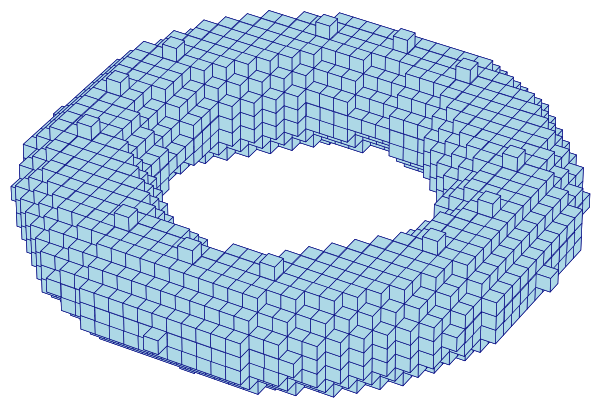 | 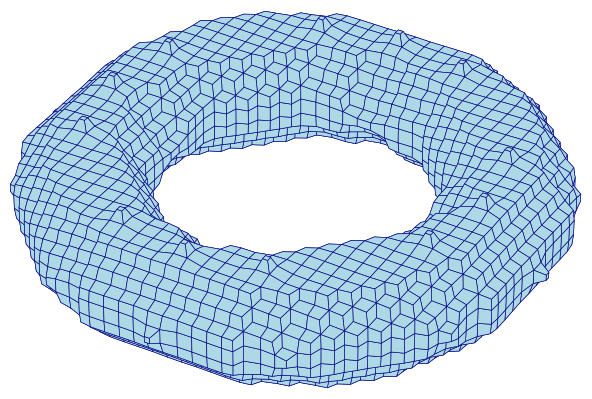 |
Figure 4.4-1: The same 3,552-element hexahedral mesh before (left) and after (right) 20 iterations of Taubin smoothing, chained directly onto meshing. Smoothing does not change the element or node count — it only relocates nodes — so the voxel "staircasing" on the left becomes a smoothed torus on the right.
Smoothing's Effect on Element Quality
Smoothing improves the visual surface, but it is not free: moving nodes off the regular voxel grid distorts elements that were, before smoothing, perfect unit cubes. Metrics quantifies this trade-off:
| metric | raw | smoothed (min) | smoothed (mean) | smoothed (max) |
|---|---|---|---|---|
| minimum scaled Jacobian | 1.000 | 0.500 | 0.933 | 1.000 |
| maximum skew | 0.000 | 0.000 | 0.090 | 0.337 |
| maximum edge ratio | 1.000 | 1.002 | 1.193 | 2.901 |
Every raw element is an identical unit cube, so its metrics are trivially
perfect. After smoothing, most elements stay close to that ideal (mean
scaled Jacobian 0.933), but the worst element — likely near the torus's
tight inner radius, where curvature is highest — drops to 0.500. For this
example that's still a well-shaped element, but it illustrates why
automesh smooth's output is worth checking with metrics before it's
used, not just visually inspected.
Chaining remesh After mesh hex smooth Fails
mesh hex smooth also accepts a further remesh subcommand at the command
line, but running it always fails on this torus, exactly as documented in
Mesh — remesh requires triangular
connectivity, and a hex mesh has none:
The mesh hex smooth remesh command
automesh mesh hex -r 0 -i torus.npy -o torus_bad.inp smooth remesh
The error message
Error: connectivity contains a non-triangular block.
Remeshing after smoothing is only meaningful for mesh tri (a triangular
isosurface, not a hex volume) — see the Stanford bunny
and Unit sphere pages for that case worked in full.
Source
The figures on this page are produced by the following script, which reads
the segmentation directly (for the raw voxel view) and the smoothed .inp
mesh (extracting its exterior quad faces for the smoothed view):
torus_figures.py
r"""This module, torus_figures.py, renders the torus segmentation and the
resulting hexahedral meshes (raw and Taubin-smoothed) used in the torus mesh
hex smooth example.

Example
-------
source ~/autotwin/automesh/.venv/bin/activate
cd ~/autotwin/automesh/book/examples/mesh
python torus.py
automesh mesh hex -r 0 -i torus.npy -o torus_raw.inp
automesh mesh hex -r 0 -i torus.npy -o torus_smooth.inp smooth
python torus_figures.py

Output
------
The `torus_raw.png` and `torus_smooth.png` visualization files, written next
to this script.
"""

from collections import Counter
from pathlib import Path
from typing import Final

import matplotlib.pyplot as plt
from mpl_toolkits.mplot3d.art3d import Poly3DCollection
import numpy as np
from numpy.typing import NDArray
from PIL import Image

# Shared "hero" view so only the mesh changes between figures.
ELEV: Final[float] = 35.0
AZIM: Final[float] = -60.0
FACECOLOR: Final[str] = "lightblue"
EDGECOLOR: Final[str] = "navy"

# Local (0-indexed) face node order for an Abaqus C3D8 hexahedron.
C3D8_FACES: Final[tuple[tuple[int, int, int, int], ...]] = (
    (0, 1, 2, 3),
    (4, 5, 6, 7),
    (0, 1, 5, 4),
    (1, 2, 6, 5),
    (2, 3, 7, 6),
    (3, 0, 4, 7),
)


def read_inp_hex(
    path: Path,
) -> tuple[dict[int, tuple[float, float, float]], list[tuple[int, ...]]]:
    """Reads nodes and C3D8 element connectivity from an Abaqus .inp file."""
    nodes: dict[int, tuple[float, float, float]] = {}
    elements: list[tuple[int, ...]] = []
    section = None
    for line in path.read_text().splitlines():
        stripped = line.strip()
        if not stripped:
            continue
        if stripped.startswith("*"):
            lower = stripped.lower()
            section = (
                "node"
                if lower.startswith("*node")
                else "element"
                if lower.startswith("*element")
                else None
            )
            continue
        parts = [p.strip() for p in stripped.split(",")]
        if section == "node":
            nodes[int(parts[0])] = tuple(float(v) for v in parts[1:4])
        elif section == "element":
            ids = [int(p) for p in parts]
            elements.append(tuple(ids[1:9]))
    return nodes, elements


def exterior_quads(
    nodes: dict[int, tuple[float, float, float]],
    elements: list[tuple[int, ...]],
) -> list[NDArray[np.float64]]:
    """Returns the mesh's exterior quad faces, each as a (4, 3) coordinate
    array.  A face is exterior if it belongs to exactly one hex element."""
    face_count: Counter[frozenset[int]] = Counter()
    for elem in elements:
        for face in C3D8_FACES:
            face_count[frozenset(elem[i] for i in face)] += 1

    quads = []
    seen: set[frozenset[int]] = set()
    for elem in elements:
        for face in C3D8_FACES:
            node_ids = tuple(elem[i] for i in face)
            key = frozenset(node_ids)
            if face_count[key] == 1 and key not in seen:
                seen.add(key)
                quads.append(np.array([nodes[n] for n in node_ids]))
    return quads


def crop_to_content(path: Path, margin: int = 10) -> None:
    """Crops a saved PNG to its non-white content, since matplotlib's
    `bbox_inches="tight"` does not shrink the whitespace 3D axes leave
    around a plot even with the axes turned off."""
    image = Image.open(path).convert("RGB")
    array = np.asarray(image)
    non_white = np.any(array != 255, axis=-1)
    rows = np.where(non_white.any(axis=1))[0]
    cols = np.where(non_white.any(axis=0))[0]
    top = max(rows.min() - margin, 0)
    bottom = min(rows.max() + margin + 1, array.shape[0])
    left = max(cols.min() - margin, 0)
    right = min(cols.max() + margin + 1, array.shape[1])
    image.crop((left, top, right, bottom)).save(path)


def render_quads(
    quads: list[NDArray[np.float64]],
    bounds: tuple[NDArray[np.float64], NDArray[np.float64]],
    out_path: Path,
) -> None:
    """Renders a list of quad faces as a shaded 3D surface, framed to the
    given (mins, maxs) bounds rather than the quads' own extent, so this
    plot shares an identical scale with a companion `render_voxels` plot."""
    mins, maxs = bounds
    fig = plt.figure(figsize=(6, 6))
    ax = fig.add_subplot(projection="3d")
    collection = Poly3DCollection(
        quads, facecolor=FACECOLOR, edgecolor=EDGECOLOR, linewidths=0.3
    )
    ax.add_collection3d(collection)
    ax.set_xlim(mins[0], maxs[0])
    ax.set_ylim(mins[1], maxs[1])
    ax.set_zlim(mins[2], maxs[2])
    ax.set_box_aspect(tuple(maxs - mins))
    ax.view_init(elev=ELEV, azim=AZIM)
    ax.set_axis_off()
    fig.subplots_adjust(left=0, right=1, bottom=0, top=1)
    fig.savefig(out_path, dpi=150, bbox_inches="tight", pad_inches=0.02)
    plt.close(fig)
    crop_to_content(out_path)
    print(f"wrote {out_path} ({len(quads)} quads)")


def render_voxels(
    filled: NDArray[np.bool_],
    bounds: tuple[NDArray[np.float64], NDArray[np.float64]],
    out_path: Path,
) -> None:
    """Renders a segmentation's occupied voxels directly, as raw cubes,
    framed to the given (mins, maxs) bounds."""
    mins, maxs = bounds
    fig = plt.figure(figsize=(6, 6))
    ax = fig.add_subplot(projection="3d")
    ax.voxels(filled, facecolor=FACECOLOR, edgecolor=EDGECOLOR, linewidth=0.3)
    ax.set_xlim(mins[0], maxs[0])
    ax.set_ylim(mins[1], maxs[1])
    ax.set_zlim(mins[2], maxs[2])
    ax.set_box_aspect(tuple(maxs - mins))
    ax.view_init(elev=ELEV, azim=AZIM)
    ax.set_axis_off()
    fig.subplots_adjust(left=0, right=1, bottom=0, top=1)
    fig.savefig(out_path, dpi=150, bbox_inches="tight", pad_inches=0.02)
    plt.close(fig)
    crop_to_content(out_path)
    print(f"wrote {out_path}")


if __name__ == "__main__":
    filled = np.load(Path("torus.npy")) != 0
    # Both figures share this one reference bounding box (the raw voxel
    # grid's own extent), so they render at an identical scale: same
    # box_aspect, same axis limits, same figure size and DPI.
    bounds = (np.zeros(3), np.array(filled.shape, dtype=float))

    render_voxels(filled, bounds, Path("torus_raw.png"))

    smooth_nodes, smooth_elements = read_inp_hex(Path("torus_smooth.inp"))
    quads = exterior_quads(smooth_nodes, smooth_elements)
    render_quads(quads, bounds, Path("torus_smooth.png"))